 by
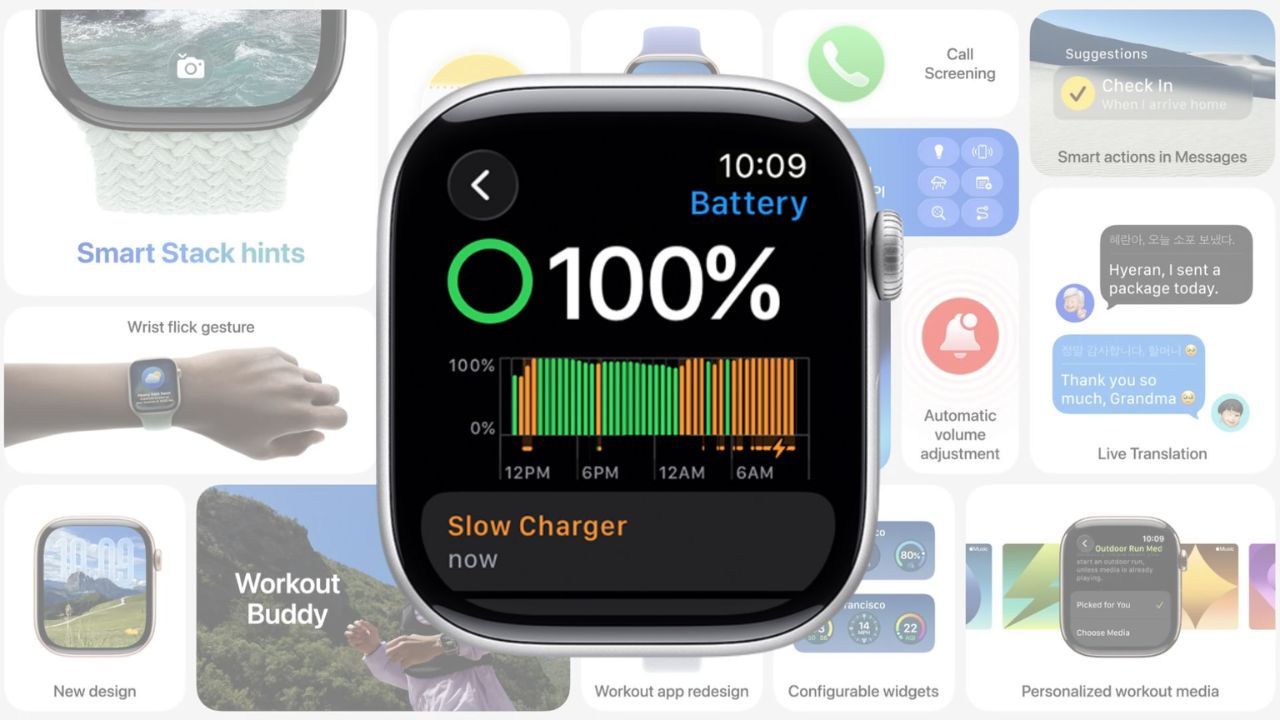
by With the release of watchOS 26, Apple has extended its “Slow Charger” warning feature to the Apple Watch, similar to the feature previously introduced for iPhones in iOS 18. This warning aims to help users diagnose or improve their charging experience by notifying them when their watch is charging slower than expected.
As highlighted by MacRumors, Apple published a new support page detailing how the feature works and offering advice on how to charge your Apple Watch more efficiently. The new message, found in the Settings > Battery section of the watch, will appear when your Apple Watch detects that its charging speed could be improved. The notification, however, does not indicate any issues with your Apple Watch or charger. Instead, it simply suggests that using a higher-wattage charger could lead to faster charging speeds.
How the “Slow Charger” Warning Works
Apple’s support page explains that the “Slow Charger” message is a prompt to inform users that while the watch is charging, there is potential for a faster charge. This could be due to using a lower-power charger or other factors impacting the charging speed.
Apple assures users that the warning is not a sign of malfunction. Instead, it serves as guidance to enhance the charging experience by suggesting users opt for a charger that offers more power.
How to Improve Apple Watch Charging Speed
For those who see the “Slow Charger” notice, Apple provides several tips on how to improve charging speed:
Why This Feature Matters
With the “Slow Charger” warning in watchOS 26, Apple is giving users more insight into their charging performance. This feature is particularly useful for those who may not realize their device is charging slower than it could be, whether due to using the wrong charger or other environmental factors. As more devices become faster-charging, understanding and optimizing charging speeds is becoming increasingly important for maintaining battery health and ensuring that your devices are always ready to go when you need them.
What are your thoughts on the new “Slow Charger” warning for Apple Watch? Share your experiences or questions in the comments below!